Extracting Data from Blood Pressure Device Photos into Using Flutter + LLMs
This project was designed specifically for extracting structured blood pressure readings
from photos of a blood pressure device screen. A lot of home blood pressure monitors can display your history, but don’t offer a clean way
to export measurements—no CSV, no API, sometimes not even Bluetooth. The result is a common friction point:
the data is “there,” but trapped on the device.
This project is an attempt to bridge that gap using a Flutter app plus an OpenAI-powered vision/LLM pipeline to turn
screen photos into reliable, searchable records.
The Use Case: When the Data Exists, But You Can’t Export It
The core workflow is simple:
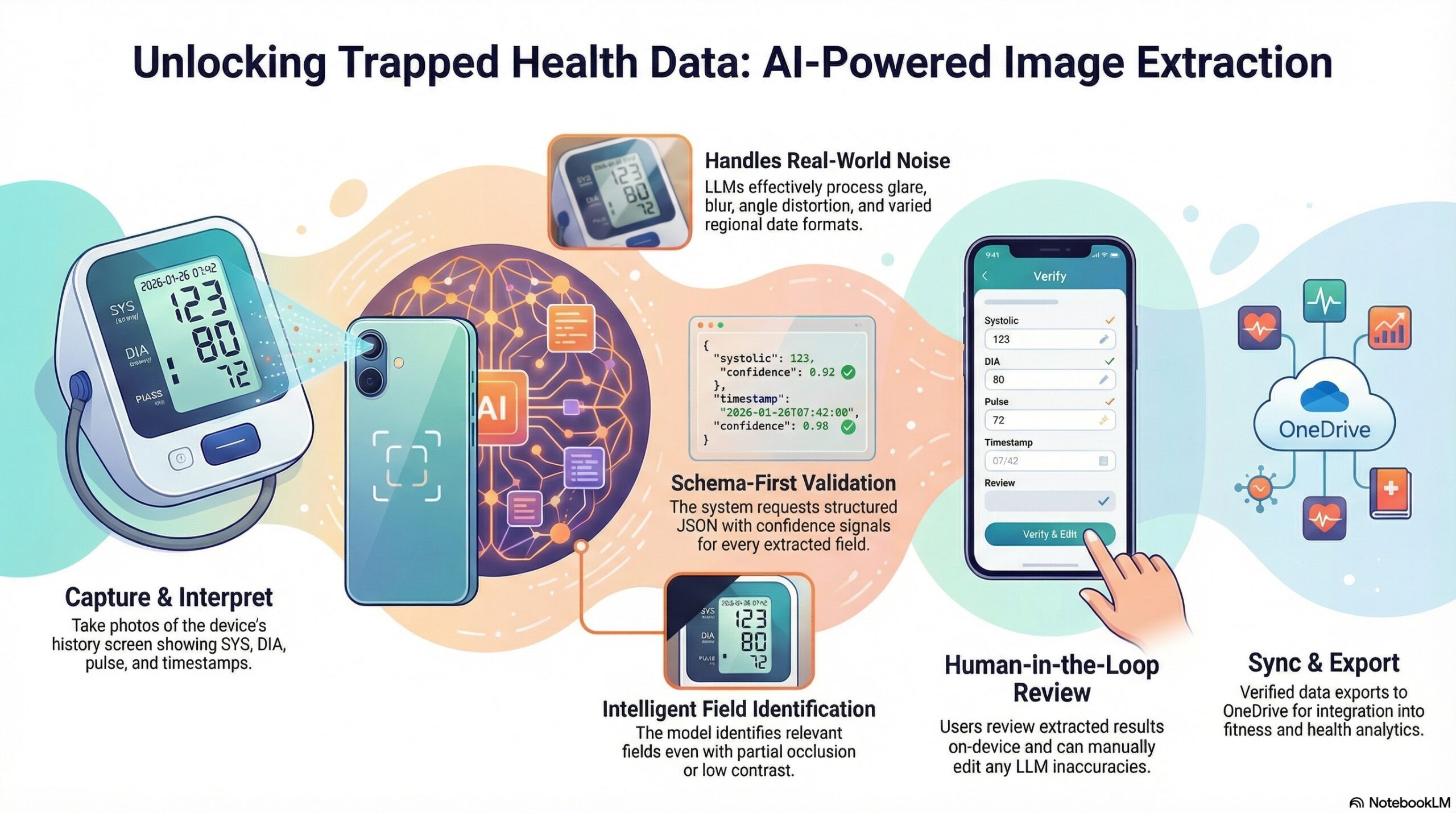
- Take a photo of the blood pressure device’s screen (e.g., the “history” screen showing SYS/DIA/Pulse + date/time).
- Let the app interpret what’s on the screen.
- Save the result as structured data so it can be searched, reviewed, and (eventually) exported.
I’m not trying to “diagnose” anything—this is about data acquisition and personal record keeping
when your hardware doesn’t provide an export mechanism.
Mobile App using Flutter
A mobile app is a great fit for this kind of tool because the photos are on the phone.
- Take mulitple days photos and extract all in batch process.
- View the results on the phone and edit them as required if the LLM doesn’t extract the data correctly.
- After data extraction and review the data is exported to OneDrive on the mobile device to be synced to laptop where it is incorporated in fitness and health analytics.
The app itself is intentionally “product-like” even though it’s a personal project: an image gallery of captured screens,
a detail page where you can review what the system extracted, and settings that let me tune the extraction pipeline.
LLM Data Extraction
The hard part isn’t taking the photo—it’s dealing with real-world variation:
- Glare, blur, angle distortion
- Different fonts and screen layouts across devices
- Partial occlusion (hand/strap), low contrast, reflections
- Date/time formats that vary by region and device
Traditional OCR alone can work, but it can also fail in frustrating ways—especially when the image quality isn’t ideal.
The approach I’m exploring uses an LLM with vision to:
- Identify the relevant fields (SYS, DIA, pulse, date/time) on a device screen
- Return a structured JSON object that’s easy for the app to store and validate
- Provide “best-effort” extraction with confidence signals and error handling
This is the key: instead of hoping OCR text “looks right,” I can ask the model to produce
a specific schema and then validate it in code.
Example of the Kind of Output I Want
{
  "systolic": 123,
  "diastolic": 78,
  "pulse": 64,
  "timestamp": "2026-01-26T07:42:00",
  "source": "screen_photo",
  "notes": "history entry 3 on screen",
  "confidence": {
    "systolic": 0.92,
    "diastolic": 0.90,
    "pulse": 0.81,
    "timestamp": 0.76
  }
}
Once I have data in a predictable shape, the app can do the rest: store it locally, show trends later,
and eventually export it.
LLM-Leveraged Development
I’m also using LLMs as part of the development process itself—this is a big part of what I’m excited about right now.
“LLM-leveraged development” (for me) looks like:
- Rapid prototyping of Flutter UI states and navigation flows
- Prompt iteration to stabilize extraction into a consistent schema
- Edge-case brainstorming (“what if the screen shows multiple readings?” “what if there’s no date?”)
- Refactoring help to keep the codebase clean as features evolve
- Test scaffolding for parsing and validation logic
The important nuance: I’m not outsourcing understanding. I’m using the model to shorten the path from
“idea” → “working iteration,” while keeping human judgment in the loop for architecture and correctness.